There’s nothing quite like Dreamforce: thousands of people, big ideas, packed sessions, new connections, and a whole lot happening across campus.
Along with its packed agenda, Dreamforce is also dedicated to creating an experience where every attendee can participate fully. That means thinking about accessibility at every turn — whether you’re finding your way to a keynote, grabbing lunch, taking a certification exam, recharging in a quiet space, or getting ready for Dreamfest.
For Dreamforce 2026, accessibility is woven throughout the attendee experience, with services, spaces, technology, and accommodations designed to help attendees participate in the ways that work best for them. Here are 10 ways Dreamforce is making that happen.
[ALT TEXT: Two “vesties” in blue vests offering accessibility support during Dreamforce 2025.]
1. Making it easier to navigate Dreamforce
Dreamforce covers a lot of ground. Fortunately, attendees have more than one way to get where they’re going.
Step-free pathways, ramps, and elevators are available throughout the venue, along with accessible entrances across Moscone and Yerba Buena Theatre. Attendees can use a hard path between Moscone North and South, while low-pile turf on Howard Street supports easier movement through outdoor event spaces.
And wayfinding goes digital, too. Interactive maps within the Salesforce Event app include text-to-speech functionality, giving attendees another tool for navigating campus.
2. Offering on-demand visual assistance with Aira
Sometimes, real-time assistance can make all the difference. Blind, low-vision, Deaf, and hard-of-hearing attendees can use the Aira app at no cost during Dreamforce.
Aira connects blind and low-vision attendees with trained remote visual interpreters who can assist with navigating the event and understanding their surroundings. Deaf and hard-of-hearing attendees can connect with a live ASL interpreter for support when an onsite interpreter is unavailable, including while checking into a hotel, ordering food, or navigating other situations beyond the event.
Attendees can also request in-person assistance from trained sighted guides or onsite ASL interpreters.
3. Putting accessibility help front and center
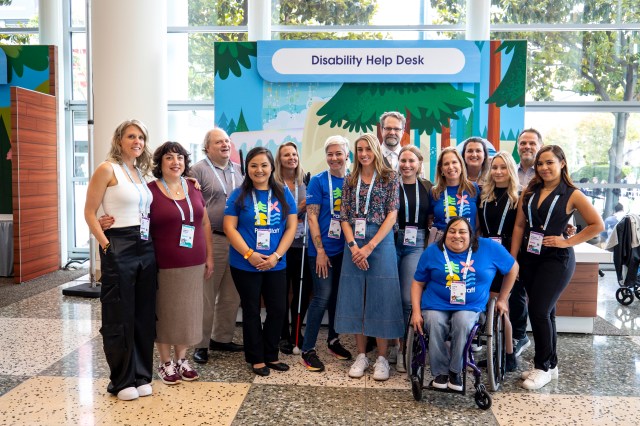
Have an accessibility question or need assistance on campus? Start with the Disability Help Desk in Moscone West, Level 1.
It’s a central resource for accommodations, priority seating, guided tours, mobility scooters, and other accessibility needs. Guided tours are also available upon request.
And help isn’t limited to the desk. Keep an eye out for trained “Vesties” in blue vests throughout campus. They’re there to provide support and help attendees navigate Dreamforce.
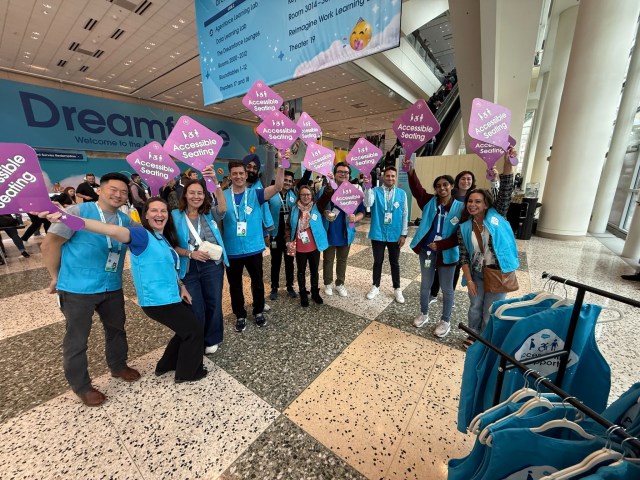
[Alt text: A group of “vesties” in blue vests holding signs that say “Accessible Seating” during Dreamforce 2025.]
4. Creating more options for mobility and movement
Busy, bustling events like Dreamforce work best when they provide accommodations that enhance mobility.
That’s why we’re offering mobility-device charging stations across campus, and motorized scooters are available through the Disability Help Desk. At registration, attendees can use an accessible line with a low-height counter. People who cannot stand for extended periods can also request to bypass lines.
If you’re traveling between locations, accessible shuttles can accommodate wheelchairs, scooters, and other mobility devices.
5. Building accessible seating into the experience
Accessible seating is built into experiences across Dreamforce, including breakout sessions, reserved accommodation seating at keynotes, and priority seating in Dreampark. Dreamfest also includes an accessible viewing platform.
Because accessibility shouldn’t stop when the keynote ends — it should extend to the moments that make Dreamforce, well, Dreamforce.
6. Expanding captions and sign language access
Whether you’re catching a keynote or diving into a breakout, Dreamforce offers several ways to make session content more accessible.
English captions are displayed in keynote rooms, and AI-generated English captions are available for breakout sessions. In larger rooms, captions appear on in-room monitors. In smaller sessions, attendees can simply scan a QR code to view captions on their own device.
ASL interpretation can be requested for individual sessions.
7. Creating spaces to rest and recharge
Dreamforce is a high-energy environment. Taking breaks to recharge can help you get more out of the experience, which is why there are quiet rooms across campus, rest areas, and priority seating where you can pause, recharge, and return when ready.
8. Making food, restrooms, and everyday essentials more inclusive
Accessible restroom stalls are available throughout Moscone, along with all-gender restroom options. Food and beverage areas include low-height counters, with vegetarian and vegan meals available. Food is labeled for gluten-free (GF), dairy-free (DF), and nut-free (NF) needs, and attendees can also take advantage of pre-ordered meal pickup.
Private rooms are available for pumping and milk expression as well.
9. Supporting service animals and individual accommodation needs
Service animals are welcome throughout the Dreamforce campus, with relief areas and water stations available to help support them during the event.
Attendees who need hotel-room accommodations can submit requests through Dreamforce housing. And because accessibility needs aren’t one-size-fits-all, the Disability Help Desk is available to help attendees find additional assistance and understand the options available to them.
10. Extending accessibility to exams and Dreamfest
Accessibility support doesn’t end with sessions.
If you’re heading to Dreamfest, accessible entry and an accessible viewing platform are available. And companions accompanying a disabled attendee to the viewing platform don’t need a separate platform ticket, making it easier to enjoy one of Dreamforce’s biggest experiences together.
Your go-to resources for accessibility at Dreamforce
A little planning can go a long way toward making your Dreamforce experience work for you.
Before and during the event, check the Accessibility tab in the Salesforce Event app for the latest information about accessibility services and accommodations. Once you’re on campus, the Disability Help Desk in Moscone West, Level 1 is your go-to destination for questions, accommodations, and assistance.
Now you’re ready to plan a Dreamforce experience that works for you.

![[Alt text: A woman sits at a desk with her laptop open. A blue screen floats between her and the laptop, displaying a live class, course materials, and an assessment in one place.]](https://workforcenavigators.salesforce.com/wp-content/uploads/2026/09/AI-for-Higher-Education-Image.jpg?w=512)